
You renewed the certificate. The files are on the server. The expiry date in the new cert is comfortably in the future. And yet: some users report warnings, your mobile app throws TLS errors, curl refuses to connect, or the browser cheerfully shows a certificate that expired last week.
This category of problem is frustrating precisely because the thing you changed is correct. The certificate is fine. The problem is almost always somewhere in the gap between "the file on disk" and "what a client actually receives and validates."
Here's how that gap opens up, and how to find where yours is.
The chain, and why it exists
A certificate on its own proves nothing. What makes it trustworthy is a chain of signatures leading back to something the client already trusts.
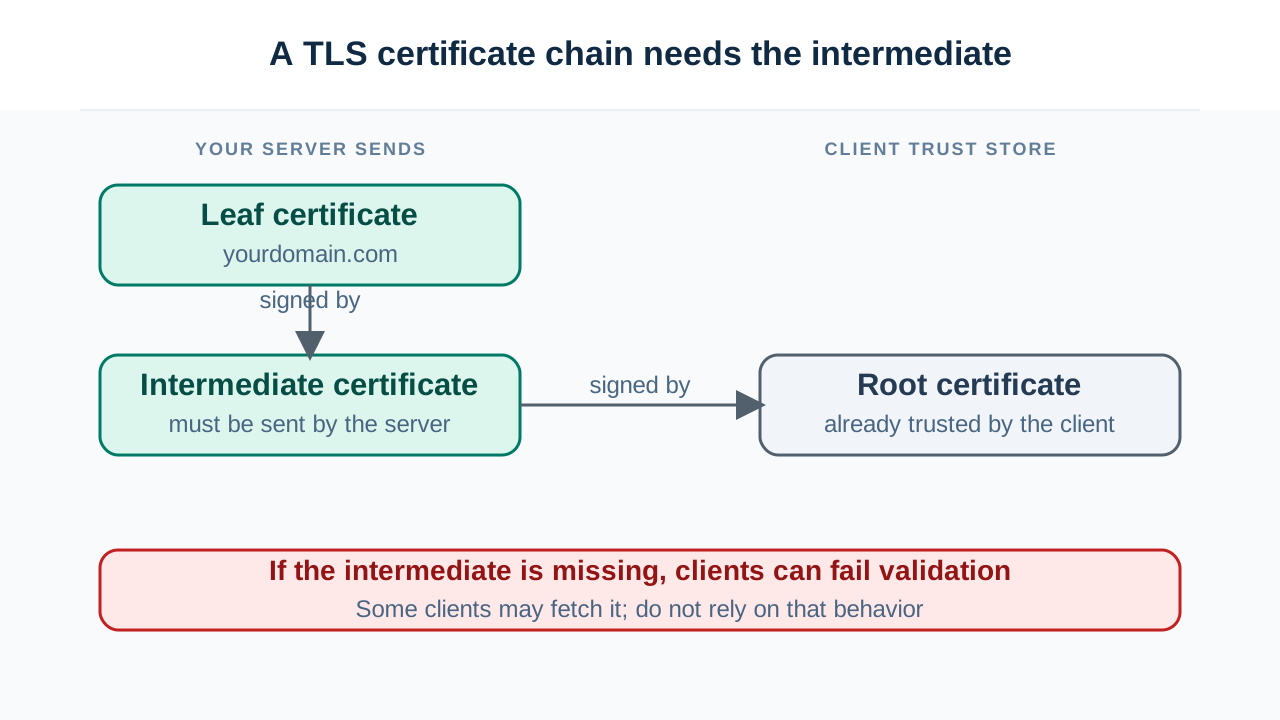
There are three tiers:
The leaf certificate. Yours. It says "this is yourdomain.com" and it's signed by an intermediate.
The intermediate certificate. Belongs to your certificate authority. It signed your leaf, and is itself signed by a root. CAs use intermediates so the root's private key can stay locked in a vault offline — if an intermediate is compromised, they revoke it without burning the root.
The root certificate. Self-signed, and trusted because it's preinstalled in the client's trust store — the set of CAs shipped with your OS or browser. Nobody vouches for the root. It's trusted by decree.
Validation walks upward: leaf signed by intermediate, intermediate signed by root, root is in my trust store, therefore leaf is trusted.
Now the critical part, and the source of most chain bugs:
Your server must send the leaf and the intermediates. The client supplies the root itself.
The root is already on the client. Sending it is harmless but pointless. The intermediates are not on the client, and if your server doesn't send them, the client has a leaf it can't connect to anything it trusts — and validation fails.
The bug that only breaks for some people
Here's where it gets genuinely maddening. You misconfigure the chain by omitting the intermediate. Then:
- Chrome works fine.
- Firefox works fine, usually.
curlfails.- Your Java service fails.
- Older Android devices fail.
- Your monitoring says everything is green.
Same server, same certificate, completely different verdicts. It looks like nonsense. It isn't.
Chrome and Windows will fetch the missing intermediate themselves. Certificates contain an extension called Authority Information Access (AIA) that includes a URL where the issuing certificate can be downloaded. When the chain is incomplete, these clients quietly go fetch it and complete the chain on their own. The connection succeeds and you never learn anything is wrong.
Firefox caches intermediates it has seen before. If it encountered that intermediate on any other site, it already has it and will use it — so it works for you and fails for someone whose browser hasn't seen it yet. This is why "it works on my machine" is so persistent here: your browser has been accumulating intermediates for years.
curl, OpenSSL, Java, Go, and most non-browser clients do none of this. They validate strictly with exactly what the server sent. If the intermediate is missing, they fail. Correctly.
So a missing intermediate isn't a broken site — it's a site that works in browsers and fails for every API client, mobile app, webhook consumer, and payment integration you have. Which is generally worse than being outright broken, because it takes longer to notice.
The lesson: never validate a certificate chain using a browser. Browsers are too helpful. Check with something that reports exactly what the server actually sent, like an SSL certificate checker that shows the delivered chain rather than a reconstructed one.
"It renewed but I'm still seeing the old certificate"
Five real causes, in roughly the order to check them:
The server never reloaded. The classic. Your renewal wrote new files and nothing told the running process. nginx, Apache, HAProxy and friends read the certificate into memory at startup and hold it there indefinitely. The file changed; the process didn't notice. A reload is required — and if your renewal automation's reload hook silently fails, you'll sail past expiry with fresh files on disk and a dead cert in memory.
A different server block is answering. With SNI, one IP can serve many certificates, chosen by the hostname the client requests. If you have multiple server blocks and the hostname doesn't match the one you think it does, you get the default block's certificate instead. Renewing the certificate you meant to serve doesn't help, because it isn't the one being served. This also produces the delightful symptom where the wrong domain's certificate shows up entirely.
A proxy or CDN is terminating TLS. If you're behind Cloudflare or similar, the certificate a user sees is the edge certificate, not yours. Your origin certificate is a separate thing on a separate lifecycle, only relevant to the connection between the CDN and your server. Renewing origin does nothing to what users see, and vice versa. Two certificates, two expiry dates, two failure modes — and people regularly renew one while the other quietly expires.
Only some backends got the new certificate. Behind a load balancer with several servers, if the renewal ran on one, you'll get intermittent failures depending on which backend answers. Feels random. Isn't.
OCSP stapling is serving a stale response. Servers cache the OCSP response they staple to the handshake. If that cached response refers to the old certificate, or the OCSP responder was unreachable when it last refreshed, clients that hard-fail on stapling problems will reject an otherwise perfect certificate.
The distinguishing question for all of these is the same: what is the server actually sending right now, over the wire? Not what's on disk. Not what your control panel says. What arrives at a client. Everything after that is narrowing down which layer is lying.
Order matters, and expired intermediates are real
Two more chain-level details worth knowing.
The chain must be in order. Leaf first, then each certificate that signed the previous one. Some clients tolerate a jumbled chain; many don't. If your certificate file was assembled by concatenating things in whatever order they arrived, this is worth checking.
Intermediates and roots expire too, and it's caused real outages. The most instructive example: in September 2021, a cross-signed root certificate that Let's Encrypt relied on for compatibility with older devices expired. Millions of certificates that were themselves perfectly valid suddenly failed on older Android devices, OpenSSL 1.0.x, and a long tail of embedded clients. Nobody's leaf certificate had expired. A certificate three tiers up did, and everything beneath it fell over.
That's the shape of the problem: your certificate's validity is necessary but nowhere near sufficient. The whole path has to hold.
A debugging order that works
-
Check what's actually served, not what's on disk. An SSL checker will show the delivered chain, expiry, and hostname coverage. If this disagrees with your files, you've found your layer — reload, wrong server block, or a proxy in front.
-
Confirm the chain is complete. Look for the intermediate specifically. If the leaf is there and the intermediate isn't, you have the browsers-work-everything-else-fails bug, whether or not anyone's reported it yet.
-
Check the hostname coverage. A certificate valid for
yourdomain.comdoesn't coverwww.yourdomain.comunless it's listed in the SAN field. The Common Name field is effectively ignored by modern clients — only Subject Alternative Names count. -
Check protocol and cipher configuration separately. A perfectly valid certificate still fails if the client and server can't agree on a TLS version — a client that only speaks TLS 1.2 against a server configured for 1.3 only. That's not a certificate problem at all, but it surfaces as a connection failure and gets misdiagnosed as one. A TLS scanner will show what versions and ciphers are actually negotiable.
-
If you suspect the certificate was never issued at all, check the CT logs. Every publicly trusted certificate is logged to Certificate Transparency logs at issuance. A CT log search tells you exactly what was issued for your domain and when — which settles "did the renewal actually happen" definitively, independent of anything on your server. It's also how you find certificates issued for your domain that you didn't request, which is a different and more alarming conversation.
The mental model to keep
A certificate isn't a file you install. It's a claim that has to survive a chain of verification performed by a client you don't control, using a trust store you didn't choose, over a connection that might be terminated by a proxy you forgot about.
Almost every "but I renewed it" problem lives in that sentence somewhere. The file is rarely the issue. The path between the file and the client almost always is — and the fastest way to find it is to stop looking at your server and start looking at what arrives on the other end.