
Three words that show up when DNS breaks, and almost nobody reads them properly. They get treated as interchangeable ways of saying "DNS is broken" — which is a shame, because each one is telling you something quite specific about who failed and where. Read correctly, the error code alone usually narrows the problem down to one of about three things before you've touched a single config file.
Here's what each one actually means, and how to act on it.
First: get the actual error, not your provider's translation of it
Most people encounter DNS errors through an intermediary — a browser saying "server not found", a ping saying "unknown host", a monitoring dashboard saying "DNS failure". All of these flatten three completely different failure modes into one message, which is exactly why DNS debugging has a reputation for being mysterious.
Query the DNS directly and it tells you plainly. Any lookup tool that surfaces the raw response — including MarinaDNS's DNS lookup — will show the response status verbatim, which is the actual starting point of any DNS investigation. What you're looking for is the status: field in the response header. That single word is the whole diagnosis.
NXDOMAIN: the name genuinely doesn't exist
NXDOMAIN is short for "non-existent domain." It means an authoritative server for that zone — the server that is the actual source of truth for the domain — was asked about this name and said, definitively, "there's no such name here."
The key word is authoritative. This is not a guess or a timeout. Something that actually knows the answer told you the name doesn't exist. If you're getting NXDOMAIN for a name you're certain you created, one of these is true:
The record was never actually published. You added it in a control panel, but it didn't save, or it saved to a zone that isn't the one being served. Surprisingly common with providers that maintain a separate "pending changes" state.
You're querying a name that's subtly different from the one you created. A trailing dot, an accidental duplicate subdomain (www.www.yourdomain.com), or a record created as @ when you meant www. DNS is unforgiving about this and won't guess what you meant.
The delegation is broken above your zone. This is the interesting one. If the parent zone's NS records don't point at the servers actually hosting your zone, resolvers never reach your records at all — and the answer they get back from whatever is being asked is NXDOMAIN. Your records exist, perfectly configured, on a server nobody is being told to ask.
It's cached negatively, and you're seeing an old answer. This trips people constantly. Under RFC 2308, when a resolver gets NXDOMAIN it caches that negative answer, and the cache duration comes from the zone's SOA record — specifically the minimum field, or the SOA's own TTL, whichever is lower. If your SOA minimum is set to 24 hours (a default on some providers), a name that didn't exist yesterday will keep returning NXDOMAIN from cache for a full day after you create it. Nothing is broken. You're just reading a memory.
That last one is worth internalizing, because it's the single most common reason for "I added the record but it's not working." The record is fine. A resolver somewhere remembers being told the name didn't exist, and it's not due to forget yet. Checking the same name across multiple resolvers in different networks will show this immediately — some will have the new record, some will still be serving the cached negative answer, and the split tells you it's a caching artifact rather than a configuration error.
NXDOMAIN vs NODATA — not the same thing
Worth a short detour, because these get conflated and the difference matters. NXDOMAIN means the name doesn't exist at all. But if the name exists and simply has no record of the type you asked for, you get NOERROR with an empty answer section — informally called NODATA.
Concretely: if yourdomain.com has an A record but no MX record, asking for its MX returns NOERROR with nothing in the answer. Asking for nonexistent.yourdomain.com returns NXDOMAIN. The first says "this name is real, just not for that purpose." The second says "this name isn't real." Tools that only report "no result found" hide this distinction, and it's often the whole answer — particularly when debugging mail routing, where a missing MX and a nonexistent hostname produce very different downstream behavior.
SERVFAIL: the resolver gave up
SERVFAIL is the most misread of the three, because it sounds like it's telling you a server failed — and it is, sort of, but not the way people assume. SERVFAIL is not an authoritative answer. Nobody with authority said anything. It's the resolver telling you it tried to find an answer and could not complete the process.
That's a meaningfully different statement from NXDOMAIN. NXDOMAIN is knowledge. SERVFAIL is the absence of knowledge, wrapped in an error code.
Causes, roughly ordered by how often they're the actual culprit:
DNSSEC validation failure. This is the big one, and it's underdiagnosed because the error gives no hint that DNSSEC is involved. If a zone is signed and a signature has expired, or the DS record at the parent doesn't match the DNSKEY in the zone, or the chain of trust is broken at any link, a validating resolver will refuse to serve the answer — even though the answer exists and is sitting right there. It returns SERVFAIL, because from a security standpoint an unverifiable answer is no answer.
The maddening part: resolvers that don't validate DNSSEC will happily return the record. So the domain works from some networks and returns SERVFAIL from others, and the difference correlates with nothing obvious from the outside. If you're seeing SERVFAIL from some places and clean answers from others, check the DNSSEC chain before touching anything else — expired signatures are the most common cause of exactly this pattern, and they expire on a schedule whether or not anyone's watching.
Nothing answered. The resolver tried the authoritative servers listed for the zone and none of them responded — down, firewalled, or the zone was never loaded. After the retries expire, that's a SERVFAIL.
Lame delegation. The parent zone points to nameservers that respond, but those servers aren't actually configured to serve that zone — they answer, but not authoritatively. The resolver gets a response that doesn't advance it toward an answer, tries the others, and eventually fails. Common after migrating providers and leaving one old NS record behind.
The zone expired on a secondary. Zone transfers stopped working, the secondary's expire timer ran out, and it now correctly refuses to serve stale data.
The debugging move for SERVFAIL is always the same: stop asking your resolver and start asking the authoritative servers directly. If the authoritative server answers cleanly but your resolver returns SERVFAIL, the record is fine and the problem is in the path — validation, delegation, or reachability. If the authoritative server also fails, you've found where it lives. A traceroute to the nameserver's IP is worth running if you suspect reachability rather than configuration — it'll show you whether packets are getting there at all, which distinguishes a network-level problem from a DNS-level one.
REFUSED: you're asking the wrong server, or you're not allowed
REFUSED is a policy answer, and it's the most straightforward of the three. The server received your query, understood it perfectly, and declined. Not "couldn't answer" — wouldn't.
Three realistic causes:
You're asking a server about a zone it doesn't host, and it won't recurse for you. Authoritative nameservers typically only answer for their own zones. Ask one about someone else's domain and, correctly, it refuses. If you've hardcoded a nameserver somewhere and the zone moved, this is what you'll see.
Access control. Many resolvers only serve specific networks — a corporate resolver serving only internal ranges, or an ISP resolver serving only its own customers. Query it from outside and you get REFUSED. This also shows up when a public resolver's regional policy differs from what you expect — a resolver perfectly happy to answer from one datacenter will refuse from another, and the query looks identical from your side.
Rate limiting or blocklisting. Some resolvers return REFUSED rather than dropping traffic when a source is querying too aggressively. Worth knowing if you're running automated checks.
The fix is nearly always the same: you're pointed at the wrong server. Point at an authoritative server for the zone, or a resolver that will actually serve your source address.
The short version
| Status | Who answered | What it means | Where to look |
|---|---|---|---|
NXDOMAIN |
Authoritative server | The name genuinely doesn't exist | Delegation, typos, negative cache TTL |
NOERROR + empty |
Authoritative server | Name exists, no record of that type | Wrong record type requested |
SERVFAIL |
Your resolver | Couldn't complete the lookup | DNSSEC, delegation, reachability |
REFUSED |
Some server, deliberately | Won't answer you specifically | Wrong server, or an ACL |
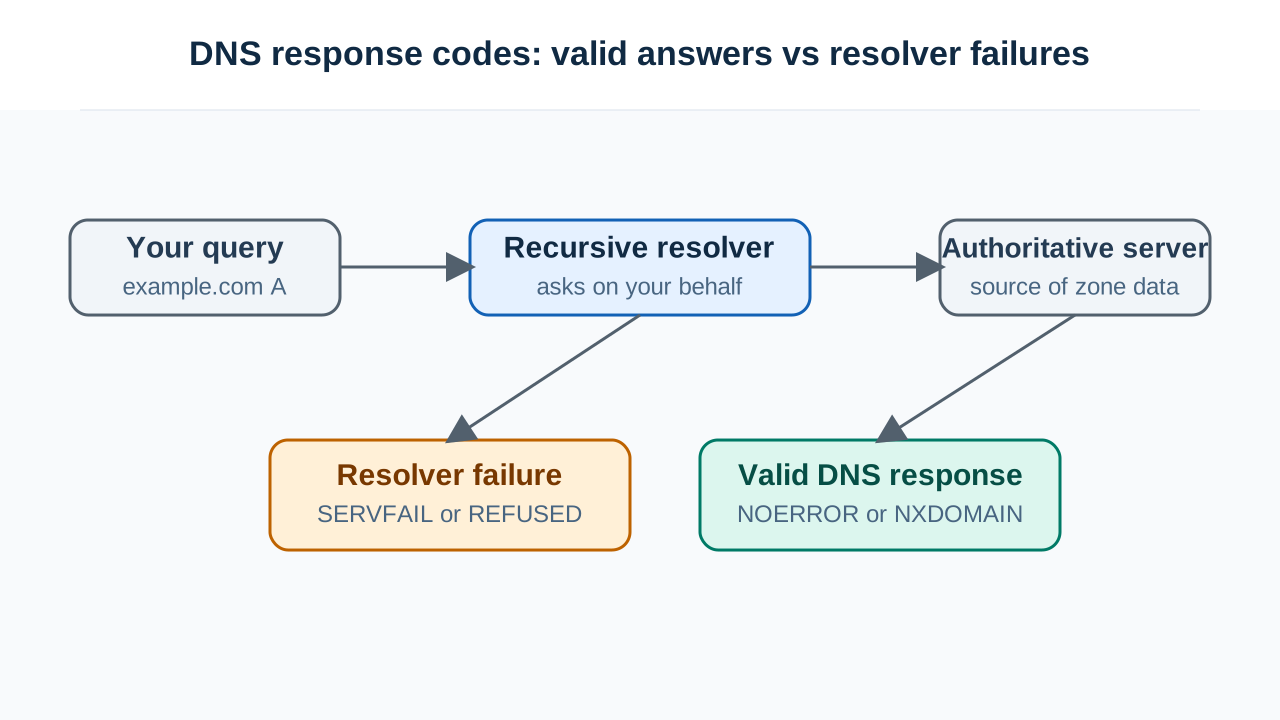
The pattern worth taking away: NXDOMAIN and NODATA are answers. SERVFAIL and REFUSED are not. The first two mean the system worked and you got the truth, even if the truth is unwelcome. The second two mean you never reached the truth at all — and the fix lives somewhere in the path between you and it, not in the records themselves.
That distinction alone will save you from the most common DNS debugging mistake, which is editing zone records to fix a problem that was never in the zone.