
Every hosting provider's support page says some version of the same thing: "DNS changes can take 24 to 48 hours to propagate."
It's one of the most durable pieces of misinformation in networking. Not because the timing is always wrong — sometimes it genuinely takes that long — but because the mental model it creates is completely backwards, and that wrong model is why people spend hours debugging problems that don't exist, and miss the ones that do.
DNS doesn't propagate. Nothing spreads outward. There is no wave of updates rippling across the internet. Once you understand what's actually happening, the timing becomes predictable, controllable, and usually much faster than 48 hours.
The thing nobody tells you: your change is already live
When you update a DNS record, the authoritative server — the actual source of truth for your zone — has the new value essentially immediately. Depending on your provider it might take a few seconds for a zone reload, or a minute for secondary nameservers to pick it up via a zone transfer. But it's live. Right now. You can go query it and see the new value.
So why does the rest of the world still see the old one?
Because nobody is asking the authoritative server. They're asking resolvers, and resolvers remember.
When a resolver looked up your record ten minutes ago, it kept the answer in memory along with a countdown — the TTL, or time-to-live, which you set on the record. Until that countdown hits zero, the resolver will keep handing out the answer it already has without asking anyone. It's not being lazy or broken. That's the entire design of DNS: cache aggressively so the internet doesn't collapse under the weight of everyone re-asking the same questions constantly.
So the change isn't propagating outward. Old answers are expiring — independently, at different moments, in millions of separate caches that each started their countdown at a different time.
Why some people see it and others don't
Here's the part that makes "propagation" feel real, and it's just arithmetic.
Say your record has a TTL of one hour, and you change it at noon.
- A resolver that cached the old value at 11:10 has ten minutes left. It shows the new value at 12:10.
- A resolver that cached it at 11:59 has fifty-nine minutes left. It shows the new value at 12:59.
- A resolver that never looked it up at all asks the authoritative server the moment someone queries it, and gets the new value instantly.
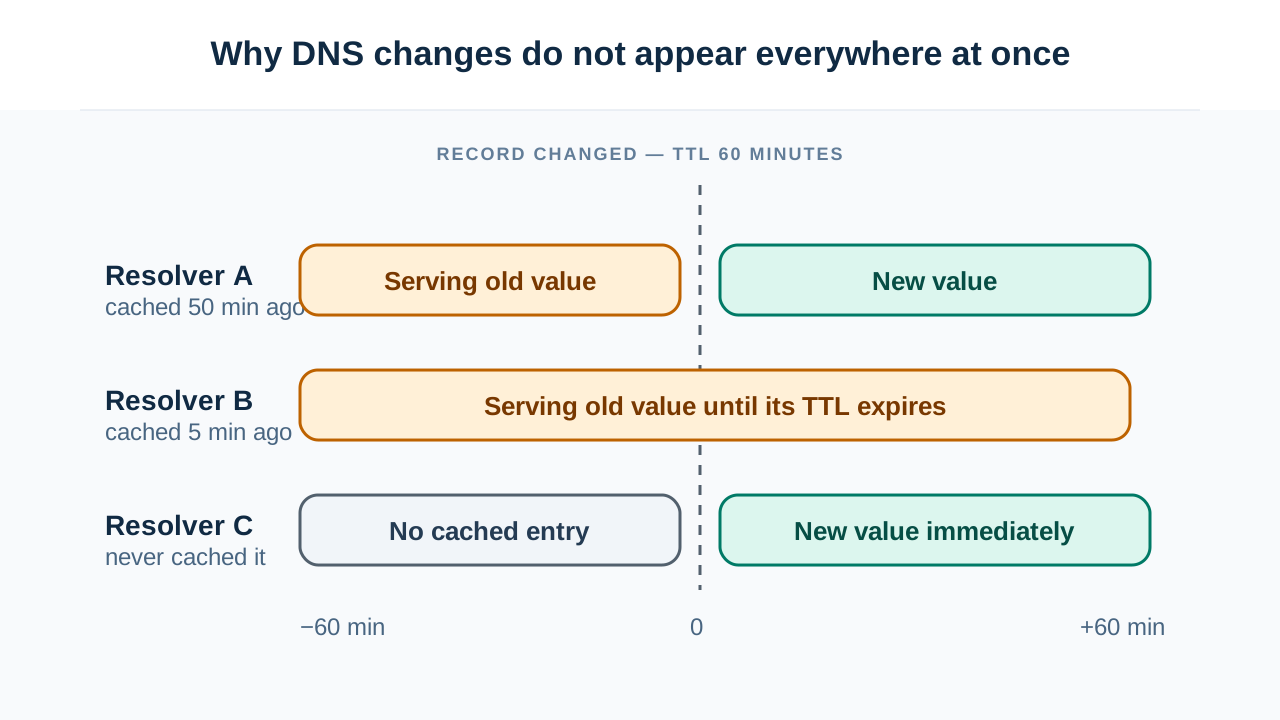
Three resolvers, three completely different switchover times, one record. Nothing propagated anywhere. Each cache simply expired when its own timer ran out.
This is why checking your record from different networks gives you contradictory answers, and why your phone on mobile data sees the new site while your laptop on office wifi doesn't. They're talking to different resolvers with different cache ages. Running a propagation check across resolvers in different networks shows you this directly — and the useful insight isn't "how far along is it," it's the split itself. A mix of old and new answers means caching. Uniformly old answers everywhere, including from resolvers that shouldn't have it cached, means your change didn't actually publish.
The maximum wait is your TTL. Not 24 hours, not 48. If your TTL is 300 seconds, the worst case is five minutes. That's the whole rule.
Then where does "48 hours" come from?
It's not entirely invented — it comes from a real thing that people then apply to the wrong situation.
There are two different kinds of DNS change, and they behave completely differently:
Changing a record inside your zone (an A record, a CNAME, an MX). This is governed by your TTL, which you control. Set it to 300 and changes take five minutes.
Changing your nameservers at the registrar. This is a delegation change, and it lives in the TLD's zone, not yours. You don't control that TTL — the registry does. For .com, the NS records in the TLD zone carry a TTL of 172800 seconds. That's 48 hours, exactly.
That's where the folklore comes from. Nameserver changes genuinely can take up to two days, because resolvers cache the delegation itself for that long. Somewhere along the way, the timing for the rare, slow operation got applied to every DNS change ever made, and hosting support pages have repeated it ever since.
If you're changing an A record, 48 hours is nonsense. If you're moving nameservers to a new provider, it's real — and there's nothing you can do to speed it up, because the TTL isn't yours.
The trick everyone gets slightly wrong
The standard advice for planning a migration is: lower your TTL before making the change. This is correct, and almost everyone executes it wrong.
The mistake is lowering the TTL an hour before the change. Here's why that fails:
Resolvers don't just cache the record — they cache the record with the TTL that was attached when they fetched it. If your TTL was 86400 (24 hours) and a resolver cached your record six hours ago, it's holding that record with 18 hours left on the clock. Lowering the TTL to 300 right now doesn't reach into that resolver's memory and change anything. It still has 18 hours to go, and it won't learn about your new short TTL until it expires and asks again.
You have to lower the TTL at least one full old-TTL period before the change. If your TTL is 24 hours, lower it 24 hours in advance. That gives every cache time to expire and re-fetch the record with the new, short TTL. Then make your change, and it'll be visible in five minutes.
The full sequence:
- Lower the TTL to 300. Wait one full old-TTL period (24 hours if it was 24 hours).
- Make your actual change. It's now visible within 5 minutes everywhere.
- Once you've confirmed everything works, raise the TTL back to something sensible.
That last step matters more than it seems. A permanently low TTL means every resolver re-queries your nameservers constantly — more load, more latency for your users, and a much bigger blast radius if your DNS provider has an outage, because nobody has a cached answer to fall back on.
Five things that look like propagation but aren't
Once the TTL has expired and it's still wrong, you're no longer dealing with normal caching. These are the usual culprits:
Your operating system has its own cache. Separate from the resolver, sitting on your machine, with its own rules. ipconfig /flushdns on Windows, sudo dscacheutil -flushcache on macOS, resolvectl flush-caches on most modern Linux. If your record works from your phone but not your laptop, check this before blaming anything upstream.
Your browser has its own cache too. Chrome maintains a DNS cache entirely independent of the OS, visible at chrome://net-internals/#dns. It's a frequent reason developers see stale results while every command-line tool reports correctly.
Your application caches at the language runtime level. The classic example is the JVM, which historically cached DNS lookups for the lifetime of the process by default — meaning a long-running Java service could hold a dead IP address for weeks, entirely unaffected by TTLs. Any long-lived process may be holding a resolved address from startup.
Public resolvers aren't one cache — they're hundreds. This is the subtle one. When you query 8.8.8.8, you're not talking to a server. You're talking to an anycast address that routes to whichever of Google's many resolver instances is closest to you, and each instance has its own independent cache. Two people querying "the same" resolver from different cities are hitting different machines with different cache states. Even querying twice from one location can land on different instances. This is why a public resolver can appear to flip back and forth between old and new answers — it's not flapping, you're just being served by different machines.
Some resolvers ignore your TTL. TTL is a request, not a contract. Plenty of ISP resolvers clamp TTLs to a minimum floor of their own — a five-minute TTL becomes thirty minutes because that's their policy. There's also a standardized mechanism (serve-stale) allowing resolvers to hand out expired records when they can't reach your authoritative servers, which is genuinely useful for resilience and confusing during a migration.
How to actually debug it
The whole diagnosis reduces to one comparison. Ask the authoritative server directly, then ask a resolver, and see whether they agree.
- Authoritative has the new value, resolver has the old one. Everything is working. It's cache. Check the TTL, wait it out. Nothing is broken and there's nothing to fix.
- Authoritative still has the old value. Your change never published. The problem is in your provider's control panel, not in DNS — the record didn't save, saved to the wrong zone, or your nameservers are pointing somewhere you didn't expect. This is a real bug, and no amount of waiting fixes it.
Querying the authoritative server directly is the entire trick, and a DNS lookup tool that lets you specify which server to ask is all you need. That single check tells you whether you're waiting on physics or looking at a mistake — and it takes about fifteen seconds, versus the day and a half of waiting the folklore recommends.
The reframe worth keeping: DNS isn't slow. Caches are patient, and you told them how long to be patient. Once you internalize that the number is yours and you set it in advance, most of the mystery evaporates — and "wait 48 hours" stops being advice you accept.