
Sooner or later everyone hits this wall. Your CDN or platform gives you a hostname — something like your-app.platform.example — and says "point your domain here with a CNAME." So you go to add a CNAME for yourdomain.com and your DNS provider refuses. Or accepts it and your email stops working. Or offers you something called an ALIAS record that nobody ever explained.
This isn't your provider being difficult. It's a rule from 1987 that still governs everything, and once you see why it exists, the whole category of problem stops being mysterious.
The three record types, briefly
A record. Maps a name to an IPv4 address. yourdomain.com → 203.0.113.5. That's it. The simplest thing DNS does.
AAAA record. Same, for IPv6. Everything true of A records is true here.
CNAME record. Maps a name to another name. www.yourdomain.com → your-app.platform.example. It's an alias, and it's genuinely useful: when the platform changes its IP addresses, you don't have to do anything. You pointed at their name, they manage what's behind it.
That indirection is the whole value. It's also the source of the constraint.
The rule that breaks everything
Here's the rule, stated plainly:
A name that has a CNAME record cannot have any other records.
Not "shouldn't." Cannot. It's specified in the original DNS RFCs and reinforced later. A CNAME doesn't mean "also known as" — it means "this name is that name, go ask there instead." Once a resolver sees a CNAME, it abandons the original name entirely and restarts the lookup at the target. Any other record sitting at the original name is unreachable by definition, so the spec forbids it existing at all.
Now apply that to your root domain.
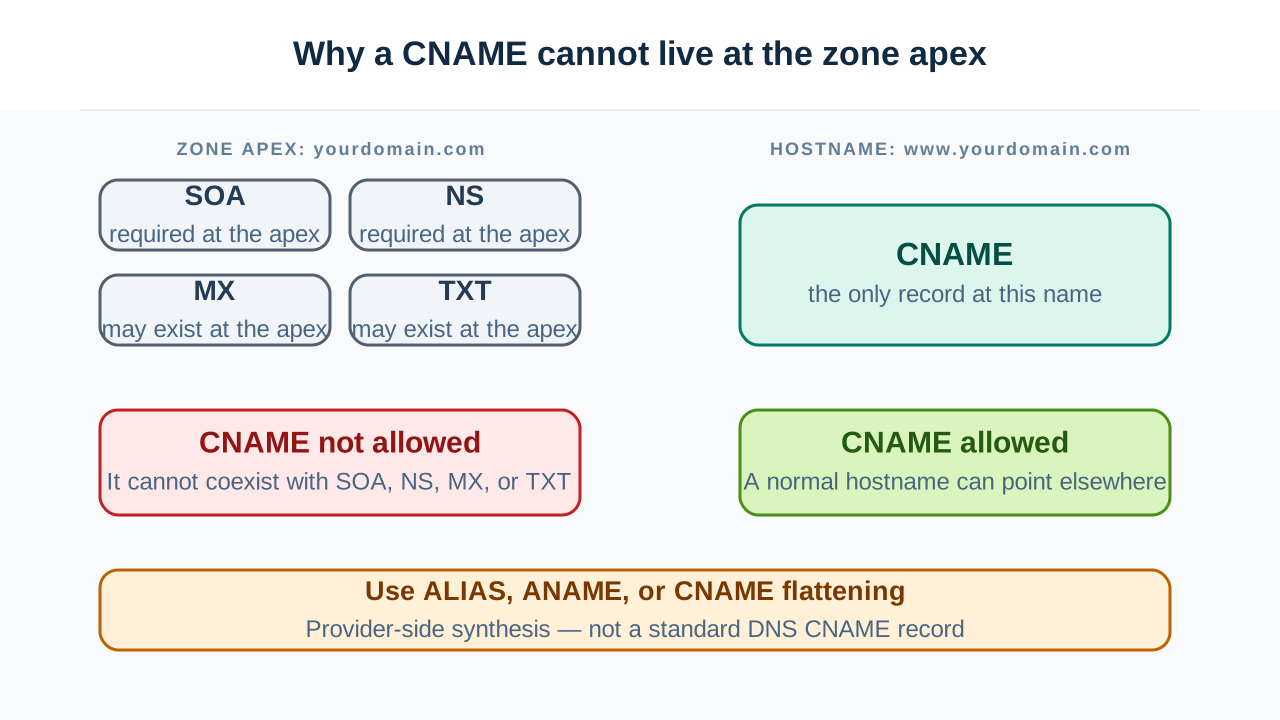
Your zone apex — yourdomain.com with nothing in front of it — is required to have records. Not optionally. Every zone must have an SOA record and NS records at its apex. They're what make it a zone. Without them there's nothing to serve.
So:
- The apex must have SOA and NS records.
- A CNAME cannot coexist with other records.
- Therefore the apex cannot have a CNAME.
That's the entire explanation. It's not a limitation of your provider, or a legacy quirk waiting to be fixed. It's arithmetic. And it also means that if you did somehow force a CNAME onto your apex, you'd be destroying your MX records, your SPF TXT record, and your domain verification records in the process — all of which live at the apex too.
This is also why www.yourdomain.com works fine as a CNAME. It's not the apex. It has no SOA, no NS, and nothing else that has to exist there. It's free to be an alias.
So what is an ALIAS record?
Providers got tired of explaining this, so they built a workaround. You'll see it under several names:
- ALIAS (Route 53, DNSimple and others)
- ANAME (some providers)
- CNAME flattening (Cloudflare)
They're the same idea. None of them are a real DNS record type. There's no ALIAS in any RFC, and no resolver anywhere knows what one is.
What actually happens: you configure an ALIAS at your apex pointing at a hostname. When a query arrives, your DNS provider resolves that hostname itself, in real time, and returns the resulting IP addresses as ordinary A records. The client sees a normal A record and is none the wiser. The indirection happened on the server side, before anyone asked.
It's a clean solution to a real problem, and it's the right answer most of the time. But it isn't free.
The resolution happens from your DNS provider's location, not your user's. This is the tradeoff nobody mentions. If the target hostname uses GeoDNS or CDN-based routing — and it almost certainly does, that's usually why you're pointing at a hostname instead of an IP — then it returns different addresses depending on who asks. With a normal CNAME, the user's resolver follows the chain, so the CDN sees something close to the user and returns a nearby edge node. With ALIAS, your DNS provider follows the chain, so the CDN sees your DNS provider and returns an edge node near them.
The result is a site that works but routes some users to the wrong region. Providers mitigate this by resolving from many locations and passing through client subnet information, with varying success. It's worth knowing the mechanism exists, because "the CDN is sending my users to another continent" is otherwise deeply confusing.
TTL behavior is the provider's decision, not yours. They're synthesizing the answer, so they choose how long it's cached and how often they re-resolve the target. If the target changes IPs, how fast you follow depends on their implementation.
It doesn't travel. ALIAS is provider-specific configuration. Move your zone somewhere else and it doesn't come with you — you'll reconfigure it in whatever dialect the new provider speaks, or discover they don't support it at all.
Two more CNAME rules people break constantly
MX and NS records must never point to a CNAME. The target of an MX or NS record has to be a name with an address record — an A or AAAA. Pointing an MX at a CNAME is explicitly forbidden, and the consequences are inconsistent rather than clean: some mail servers follow it anyway, others reject it, so you get mail that delivers from some senders and fails from others with no obvious pattern.
This one bites hard because it looks like it works. Your own tests pass. A subset of senders can't reach you, and you find out weeks later.
CNAME chains are legal but cost you. A CNAME can point to a name that's itself a CNAME. Each link is another round trip before anyone gets an address, and resolvers cap how many they'll follow before giving up. Two hops is usually fine. Chains built by pointing at a vendor who points at another vendor who points at a CDN get slow and fragile, and they fail in ways that look like intermittent DNS problems.
If you're ever unsure how deep a chain actually goes, a DNS lookup shows every link — the full chain from your name to the final address, which is often longer than anyone realized.
Choosing, in practice
| Situation | Use |
|---|---|
| You have a stable IP address | A record |
| Subdomain pointing at a platform or CDN | CNAME |
| Apex pointing at a platform or CDN | ALIAS / ANAME / flattening |
| Apex, and your provider has no ALIAS | Redirect apex → www, CNAME the www |
| MX or NS target | A record only. Never a CNAME |
That fourth row is the old-school answer and it's still perfectly valid: serve a redirect at the apex, put the actual site on www, and CNAME the www. Plenty of large sites do exactly this. It costs one redirect and sidesteps the entire problem.
The mental model
A CNAME isn't a pointer you can hang next to other things. It's a redirect for the entire name — and a name that's been redirected can't also be a mail destination, a zone apex, or anything else.
Everything else follows from that. The apex can't be a CNAME because the apex has to be other things. ALIAS exists because that's inconvenient. ALIAS has geolocation quirks because someone else is doing the lookup on your behalf. MX can't point at a CNAME because a redirect isn't an address.
One rule, several consequences — and after enough time you stop having to re-derive it. When something refuses a CNAME, the first question is: what else has to exist at that name? The answer is nearly always the explanation.