
You send an email. You know it's legitimate — it's from your own domain, written by an actual human, about actual business. And it lands in spam anyway. Or worse, it doesn't land anywhere: no bounce, no error, just silence, because some receiving server quietly dropped it.
If you've ever stared at a "message sent" confirmation while knowing, somehow, that the message is never going to be read — this is for you. Not a checklist. A walkthrough of how to actually find out what's broken, in the order a real investigation goes.
The three-letter acronyms nobody explained properly
Before debugging anything, it helps to understand what's actually being checked, because the failure modes only make sense once you know what each mechanism is for.
SPF (Sender Policy Framework) answers one question: "Is this server allowed to send mail for this domain?" It's a DNS TXT record listing the IP addresses and services authorized to send as you. When an email arrives, the receiving server checks the envelope sender — the address used in the actual SMTP transaction, which isn't always the same as the "From" address you see — against that list. If the sending server isn't on it, SPF fails.
DKIM (DomainKeys Identified Mail) answers a different question: "Was this message actually sent by the domain it claims, and has it been tampered with?" It works by cryptographically signing the email at send time with a private key, and publishing the matching public key in DNS. The receiving server pulls the public key, verifies the signature, and confirms the message wasn't altered in transit. Unlike SPF, DKIM doesn't care what server sent the mail — it cares whether the signature is valid.
DMARC (Domain-based Message Authentication, Reporting and Conformance) is the policy layer sitting on top of both. It tells receiving servers what to do when SPF or DKIM fail — quarantine it, reject it outright, or do nothing and just report back to you. DMARC is also what enables "alignment" checking: it's not enough for SPF or DKIM to individually pass, the domain they're checking against has to match what's actually in the visible "From" header. This is the part almost everyone misses, and it's usually the actual root cause when SPF and DKIM both look fine individually and mail still fails.
Start with what actually happened, not what should have happened
The instinct is to open your DNS records and start reading them top to bottom, looking for a typo. Don't do that yet — you're reading intent, not outcome, and the two frequently disagree in ways that are invisible until you look at a real delivery attempt.
Instead, get an actual message that failed or landed in spam, and look at its headers. Every major mail provider (Gmail, Outlook, etc.) lets you view the "original" or "raw" version of a received email, which includes an Authentication-Results header — this is the receiving server telling you, in its own words, exactly what it checked and what happened.
It looks something like this:
Authentication-Results: mx.google.com;
       spf=pass (google.com: domain of bounce@yourdomain.com designates 203.0.113.5 as permitted sender)
       dkim=pass header.i=@yourdomain.com header.s=selector1
       dmarc=fail (p=REJECT sp=REJECT dis=none) header.from=yourdomain.com
Read that carefully. SPF passed. DKIM passed. DMARC still failed. This is the exact scenario most guides don't explain, because it looks contradictory — everything passed, so why did the whole thing fail?
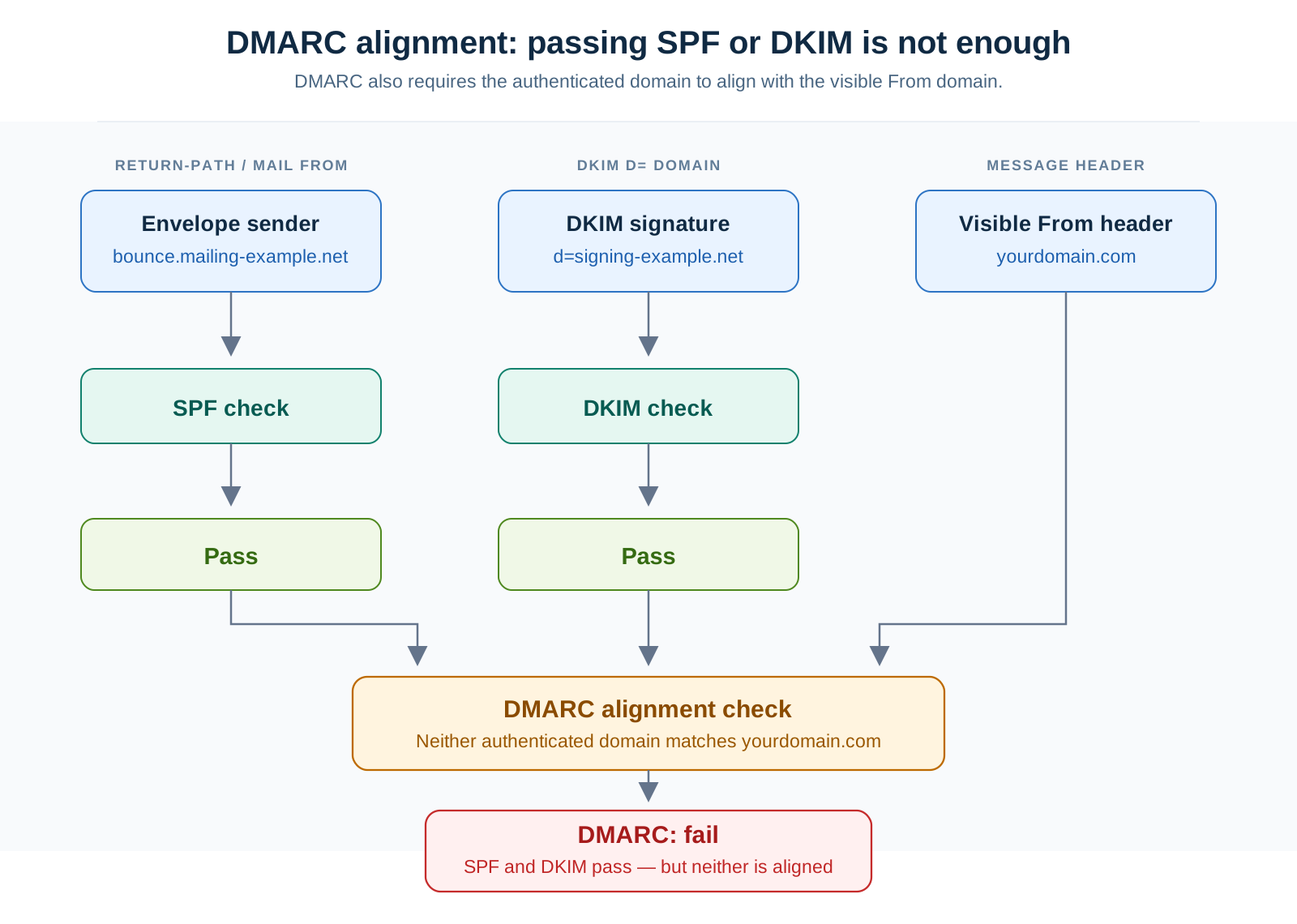
The answer is alignment. SPF passed against bounce@yourdomain.com — that's the envelope sender, often a different subdomain used for bounce handling (common with marketing platforms, transactional email services, and anything using a third-party sender). DKIM passed for yourdomain.com. But DMARC checks whether the domain in the visible From header — what the recipient actually sees — matches what SPF or DKIM authenticated. If your visible From is yourdomain.com but your SPF pass was for a bounce-handling subdomain that isn't properly aligned, DMARC fails even though the individual checks look clean.
This is precisely what a header analyzer is for — pulling this apart without needing you to parse raw SMTP headers by hand. I built MarinaDNS's Email Header Analyzer for this exact moment: paste in the raw headers from a failed message, and it breaks the authentication chain into individual pass/fail/alignment results instead of leaving you to decode Authentication-Results syntax manually.
Now check what your DNS actually says, not what you think it says
Once you know which check failed, go verify the actual published record — because there's a very good chance it doesn't say what you think it says. DNS records for email authentication are notoriously easy to get subtly wrong: an extra space, a missing ~all, a record split across two TXT entries that should have been one, a DKIM selector that was rotated by your email provider and never updated in DNS.
Common failure patterns, roughly in order of how often they actually show up:
SPF record exceeds the lookup limit. SPF allows a maximum of 10 DNS lookups during evaluation — every include: mechanism counts, and they nest. If you're using Google Workspace, Mailchimp, and a transactional service like SendGrid all in one SPF record, each with its own nested includes, it's easy to blow past 10 without realizing it. When that happens, most validators don't fail gracefully — they return a permerror, and receiving servers often treat that as an outright fail, not "give benefit of the doubt."
Multiple SPF records instead of one merged record. The spec is explicit that a domain should have exactly one SPF TXT record. If a previous provider added one and a new one got added later without removing the old, you now have two, and per RFC 7208 that's an automatic permanent error — the entire mechanism breaks, silently, until someone notices.
DKIM selector mismatch. Every DKIM signature specifies a selector (visible in the d= and s= tags of the signature) telling the receiving server which specific DNS TXT record holds the public key — because a domain can have several DKIM keys active at once for different services. If your email provider rotated keys and the DNS wasn't updated with the new selector, or if you're using two services (say, Google Workspace for regular mail and a marketing platform for campaigns) and only one selector is published, the mismatched signatures fail even though DKIM is technically configured.
DMARC policy set to p=reject before alignment was actually confirmed working. This is the one that turns a minor authentication gap into total mail loss. DMARC's reporting mode (p=none) exists specifically so you can watch aggregate reports and confirm every legitimate sending source is aligning correctly before you tell receiving servers to reject anything that doesn't. Jumping straight to p=reject — often done because a security audit flagged the domain for not having strict DMARC — without going through p=none and then p=quarantine first is the single most common cause of "we can't figure out why some emails just vanish."
This is what MarinaDNS's SPF/DKIM/DMARC Checker is built to catch — it pulls the live records for a domain and flags exactly these patterns (lookup count, duplicate records, missing alignment) rather than just confirming a record exists.
Reading a DMARC aggregate report without wanting to close the tab
If DMARC is set to send reports (rua= tag in the policy), you're already getting the data you need to fix this properly — it's just delivered as a compressed XML file, once a day, from every major mail receiver that got a message claiming to be from your domain. Nobody enjoys opening these by hand, and that reluctance is exactly why so many domains run DMARC in reporting-only mode for years without anyone actually reading the reports.
The structure, stripped of the XML noise, is basically:
- Which IP sent mail claiming to be from you
- Whether SPF passed, and whether it aligned
- Whether DKIM passed, and whether it aligned
- How many messages matched this pattern
The useful move is grouping by source IP and asking, for each one: is this a server I recognize? If yes, and it's failing alignment, that's a configuration gap on a legitimate service you should fix. If it's an IP you don't recognize sending mail that fails both SPF and DKIM, that's someone attempting to spoof your domain — and it's exactly what DMARC exists to surface. Seeing consistent alignment failures only from unfamiliar IPs, alongside consistent passes from your known sending services, is actually the healthy state before you move to enforcement — it means legitimate mail is aligning and the failures are attempted spoofing, not misconfiguration.
What actually fixes it, in the order to do it
Once you know which layer is failing and why, the fix is usually mechanical:
- Consolidate to one SPF record. If you have two, merge them into a single TXT record with all necessary
include:mechanisms combined. - Flatten or trim SPF includes if you're near the 10-lookup limit. Some services offer "flattened" SPF snippets that resolve to static IPs instead of nested includes specifically to avoid this.
- Confirm every sending service's DKIM selector is actually published in DNS, not just configured on the sending platform's side — these are two separate steps and it's common for one to get done without the other.
- Set DMARC to
p=nonefirst if you're not already there, watch reports for at least a full send cycle (including monthly newsletters or batch jobs, not just daily transactional mail), then step up top=quarantine, and only move top=rejectonce reports show consistent alignment from every legitimate source.
The order matters more than the individual steps. Fixing DKIM without checking SPF alignment, or jumping straight to strict DMARC enforcement without a reporting period first, are the two ways this goes wrong even when every individual record is technically correct.
If you're mid-diagnosis right now, the fastest path is: pull the failed message's raw headers into an analyzer to see exactly which layer failed and whether it was an alignment issue, then check the live DNS records with a checker to see whether what's published actually matches what you intended. Nine times out of ten, the gap between those two things is the entire problem.