
The bug report is always some version of the same thing. It works here and not there. It works on wifi but not on cellular. It works for you and not for the customer. It worked yesterday. Nothing changed.
When a site behaves differently depending on where you're standing, DNS is the first place to look — not because DNS is fragile, but because "DNS" isn't one thing. Your laptop, your phone, your CI runner, and your customer in another country are all asking different servers, running different software, with different policies, different caches, and in some cases actively different answers.
Here's the map of who's actually answering, and why they disagree.
Your DNS settings are probably not being used
Start with the assumption everyone makes: that the resolver configured in your OS network settings is the one answering your queries. This has been increasingly untrue for years.
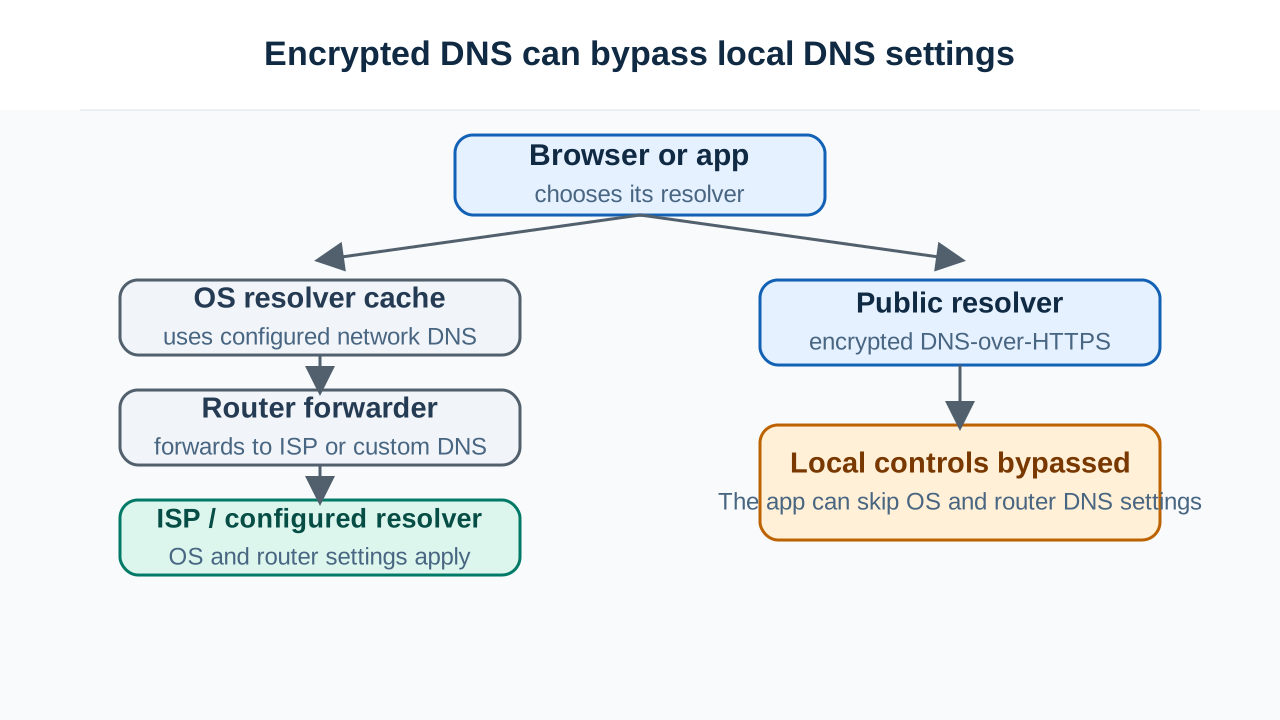
Browsers now do their own DNS. Firefox enables DNS-over-HTTPS by default in several regions, routing lookups to a resolver of Mozilla's choosing over an encrypted connection — completely bypassing your operating system's resolver, your router, and your ISP. Chrome does something similar, automatically upgrading to encrypted DNS when it detects your configured resolver supports it.
The practical consequence is jarring the first time you hit it: you can change your OS DNS settings and your browser won't care. You flush the OS cache and the browser still resolves the old value, because the OS cache was never in the path. You point at an internal resolver for a private hostname and the browser can't find it, because it's asking a public resolver on the other side of the internet.
If a hostname resolves in your terminal but not in Chrome — or vice versa — this is very often why. They're not talking to the same server.
Applications hold their own caches too. Long-running processes commonly resolve a hostname once at startup and keep it. Some language runtimes have historically cached DNS results for the life of the process by default. A service that's been up for three weeks may be using an IP address from three weeks ago, entirely unaffected by anything you change.
Split-horizon: the same name, two truthful answers
Many organizations run split-horizon DNS: the same domain resolves to different addresses depending on who's asking. Inside the office, app.company.com points to a private address. Outside, it points to the public one.
This is deliberate and useful, and it produces exactly the symptom in the title. On the VPN it works, off the VPN it doesn't. Wifi is fine, cellular is broken. Nothing is misconfigured — you're getting two different, both-correct answers from two different views, and whichever one you got depends on which resolver you reached.
This becomes genuinely confusing when a device is partially on the internal network: split-tunnel VPNs, or a browser doing DoH to a public resolver while the OS is pointed at the corporate one. Now a single device gets internal answers for some lookups and external answers for others, on a rule set nobody can quite reconstruct.
What resolvers do to your answers
Not every resolver is a neutral pipe. Several will change what you get:
NXDOMAIN hijacking. Some ISP resolvers intercept "domain doesn't exist" and return an IP address for a search or advertising page instead. From the client's perspective a typo'd domain now resolves, which breaks any software that relies on NXDOMAIN meaning what it says — and quietly defeats fallback logic in mail servers and applications.
TTL clamping. A resolver may enforce its own floor or ceiling on how long it caches, regardless of what you set. Your carefully-chosen 300-second TTL becomes thirty minutes because that's the policy. This is why migrations sometimes take dramatically longer for a subset of users.
Filtering and blocklists. Quad9, many corporate resolvers, and a growing number of ISP resolvers refuse to resolve domains that appear on threat feeds. If your domain lands on a list — through a compromise, a shared IP with a bad neighbor, or a false positive — it will simply not resolve for those users, while working perfectly everywhere else. You will not be notified. Checking whether your domain or IP is on a blacklist is worth doing when the failure pattern correlates with specific networks rather than specific records.
DNSSEC validation, or not. A validating resolver refuses to return an answer it can't cryptographically verify. A non-validating one hands it over without checking. So a zone with an expired signature works from some networks and returns SERVFAIL from others — and the difference correlates with resolver software, not geography. If failures cluster oddly, checking the DNSSEC chain separates this from everything else quickly, because expired signatures produce exactly this split.
The one that explains "slow in some countries"
This one is subtle and underappreciated: EDNS Client Subnet, usually shortened to ECS.
If you use a CDN or any GeoDNS setup, the authoritative server picks an answer based on where it thinks you are. But it doesn't see you — it sees your resolver. If you're in Istanbul using a resolver whose nearest instance is in Frankfurt, the authoritative server sees Frankfurt and hands back a European edge node.
ECS was designed to fix this: the resolver includes a truncated portion of the client's IP in the query, so the authoritative server can geolocate the actual user rather than the resolver.
The catch is that support varies deliberately. Google's public resolver sends ECS. Cloudflare's 1.1.1.1 largely does not, as a deliberate privacy decision — they don't want to reveal client subnets to every authoritative server.
The consequence: the same user, on the same connection, gets routed to different CDN nodes depending on which public resolver they use. With ECS they get the nearby node. Without it, they might get one on another continent. The site works — it's just inexplicably slower for some people, and there's nothing wrong with your DNS records at all.
If you're chasing regional performance complaints and your DNS "looks fine," this is a strong candidate. It's also completely invisible unless you specifically look for it.
Mobile has its own layer of weirdness
Cellular networks add complications that don't exist on wired connections:
- Carrier resolvers cache aggressively and are often slower to reflect changes.
- Carrier-grade NAT means your apparent source address is shared with a large pool of other subscribers, which interacts badly with ECS-based geolocation and IP-based rate limiting.
- Private Relay and VPN-like features on modern phones route DNS through the provider's infrastructure, so your user's DNS is happening somewhere entirely unrelated to where they physically are.
- Roaming frequently means DNS queries are answered by the home carrier's resolver, in the home country, while the device is elsewhere.
That last one produces the delightful case where a user in one country gets CDN answers for another because their carrier is answering DNS from home.
How to actually diagnose it
The core move is to stop asking "is DNS broken" and start asking "which resolver, and what did it say."
-
Find out what the failing device is actually using. Not what's in settings — what's in the path. Check whether the browser has DoH enabled; on a phone, check whether a private relay or VPN feature is active.
-
Compare answers across resolvers. If different resolvers return different records, check the same name across multiple resolvers in different networks. Two patterns to distinguish: a split between old and new values means caching (wait for TTL). A split between different values that are each internally consistent means split-horizon, GeoDNS, or filtering — and those don't resolve by waiting.
-
Ask the authoritative server directly. Query the source of truth and compare. If the authoritative answer is correct and a resolver disagrees, the problem is in the resolver path — cache, filter, or validation — not in your zone.
-
Check the IP you're actually getting. If different networks are landing on different addresses, an IP lookup will tell you which provider and region each one belongs to. That immediately distinguishes "GeoDNS is working as designed" from "this user is being sent somewhere absurd."
-
Rule out DNSSEC and blocklists before touching records, since both produce clean failures on some networks and none at all on others.
The reframe
There is no such thing as "what does this domain resolve to." There's only "what did this specific resolver, at this moment, with this cache state, this validation policy, this filtering list, and this view of your location, return to this client."
Most of the time all those answers agree, which is why the simplification usually works. When they stop agreeing, the question isn't whether DNS is broken — it's whose DNS you're actually looking at, and that's a question you can answer in about five minutes once you know to ask it.